Why do we need the ER diagram?
Too frequently, both in training and implementation, people ask me about the entity relationship. Although we added the list of available tables in SpiraDocs, I find it missing fields and has inconsistent names.
Further, as we grow the functionality, we keep adding more tables and views which are not consistent with the list of queries in the Query Builder.
Initial Attempts
Addressing these observations over time, I created many requests to product to fix the SpiraDocs as well as update the backend where necessary to ensure consistent naming guidelines.
Recently, in meetings with clients and partners, I have seen requests to me asking how to get my brain dump to develop custom queries. Yes, it is a large request. While I can't train people on ESQL or XSLT, I asked myself how to accomplish this?
In response to some customers asking for the database schema, I asked a few partners to create the ER diagram. Through the Partnership training series, I also showed how to make the connections based on SpiraDocs.
But I didn't see anyone volunteer or express interest. On the contrary, I only saw hesitiation.
So, I began taking this as a pet project!
Challenges in creating the Model
Frequently, people think of using the diagramatic tools (e.g.: Visio, PowerPoint) to create the ER diagram. Some with experience to SQL Management studio can create this ER diagram. But, creating the schema with the crowfoot notation for relationship is cumbersome when there are too many entities. In addition, some entities on SpiraDocs is very long because not all of them are not just stand-alone entitites. So, when representing all the available entities on SpiraDoc, the result will not be visually appealing. Nor will it be helpful. Besides, such an approach will also be difficult for ongoing maintenance when this approach is handed over to the product support team for continued updates. So, I began experimenting ideas.
Sri's Minimal ERD Approach
Having reviwed a few known tools and explored other ideas, I decided to use the DBNL syntax to create these minimal ER model (only primary and foreign keys). If I enforce all the referential integrities, it will be too cumbersome and less usable for anyone. I also decided to refer to the SpiraDocs where additioanl attributes exist. So, after checking a few tools, I landed on dbdiagram that allowed the data definition langauge (DDL) and Data Control Lanaguage (DCL) syntax to create the ER diagrams.
I don't have a name for the model but I see this as "Spira Minimal Entity Relationship "Diagram.
- Spira - Focus on all the Spira editions
- Minimal - Bring only relevant and not all the referential integritites
- Entity - Focus on the reference tables listed in SpiraDocs used in the adhoc Query builder
- Relations - Show the minimally required references using the crowfoot notation
Experiment Details
- I categorized the large ER model into smaller subgroups so that the models becomes self-explanatory as much as possible. Thease groups are listed in Table 1.
- For each group, I created an "Overview" table listing the entity name, primary key, and a link to SpiraDocs for SpiraDocs Reference for Additional fields.
- I also created the "Schema" using the DBNL syntax and repositioned the diagram for better readability. I have also linked the code I created for the DBNL schema.
- For each group, I created "Tips & Tricks" to give some guidance on the schema and write queries.
- For each group, I also created "Example Queries" with 3 specific use-cases and wrote the queries.
NOTE: While this dbdiagram tool provided a means to embed images directly from the code created, it required an advanced premium, which I was not sure required at least for now. So, I used the free tool features to design the SMEAR model in phases and downloaded the schema to complete my experiment.
Table 1: Sri' ERD Summary
| Group Name | Summary Description |
| Essential PPM | A collection of entities representing how the workspaces are organized as products, programs, and portfolios. Products derive properties from templates. |
| Essential Traceability | A collection of entities representing how essential artifact traceability is maintained using requirements, testcases, and incidents. |
| Scenario Traceability | A collection of entities that allow scenario level traceabilities using test sets, configurations, and automation hosts. |
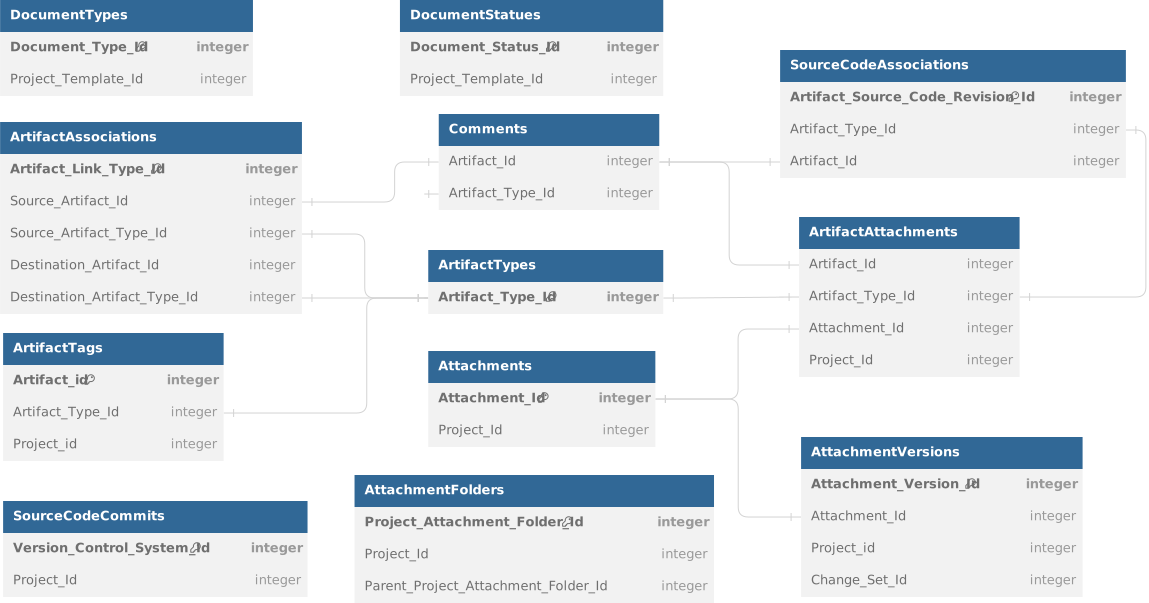
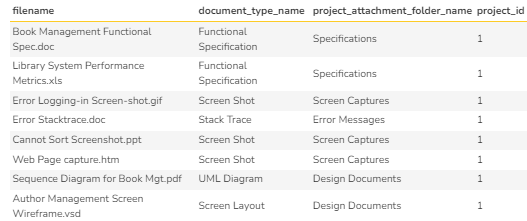
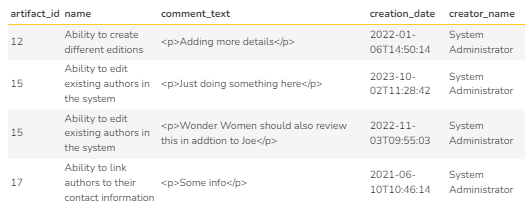
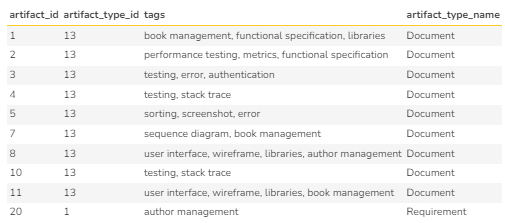
| Artifact Connections | A collection of entities that allow track documents, associations, and comments. |
| Team Accountability | A collection of entities that use tasks and risks. |
| Product Auditability | A collection of entitites that use baselines and history tracking. |
| Program Functions | A collection of entities for program and portfolio level information to support scaled agile functions. |
Given below is the high level visual summary of these entity groups.
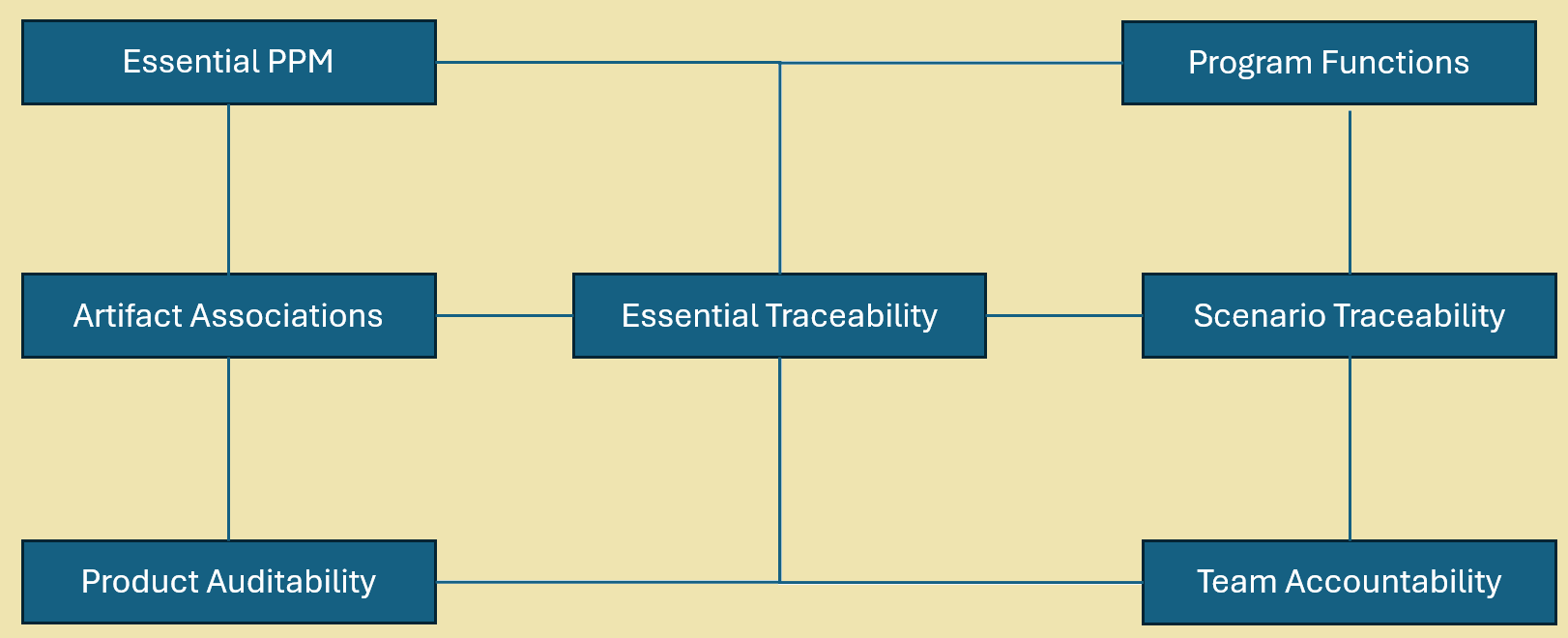
Note: Please note that some entities do not fall within any of these groups. At this point, it is the "Events" table.
Next Steps
- My goal is to validate my schema and approach in this document.
- Although I have done my best to validate the primary keys and foreign keys and the type of cardinal relationship, it will good to verify.
- Then, request the product team to incorporate this as an SpiraDocs Reference for Additional navigational menu item in SpiraDocs under reporting.
- Verify, review, and revise the "Tips & Tricks" to give some guidance on the schema and write queries.
- With every product release that contain database changes, request that this documentation be updated as well.
Sri's Next Experiment
My next experiment is to use AI to use this model to create queries. But, one at a time!
Each section has four tabs that contain details for that section. Please click on the tabs to review the details.
Essential PPM
This group represents a collection of entities representing how the workspaces are organized as products, programs, and portfolios. Products derive properties from templates.
Overview
Schema
Tips & Tricks
Example Queries
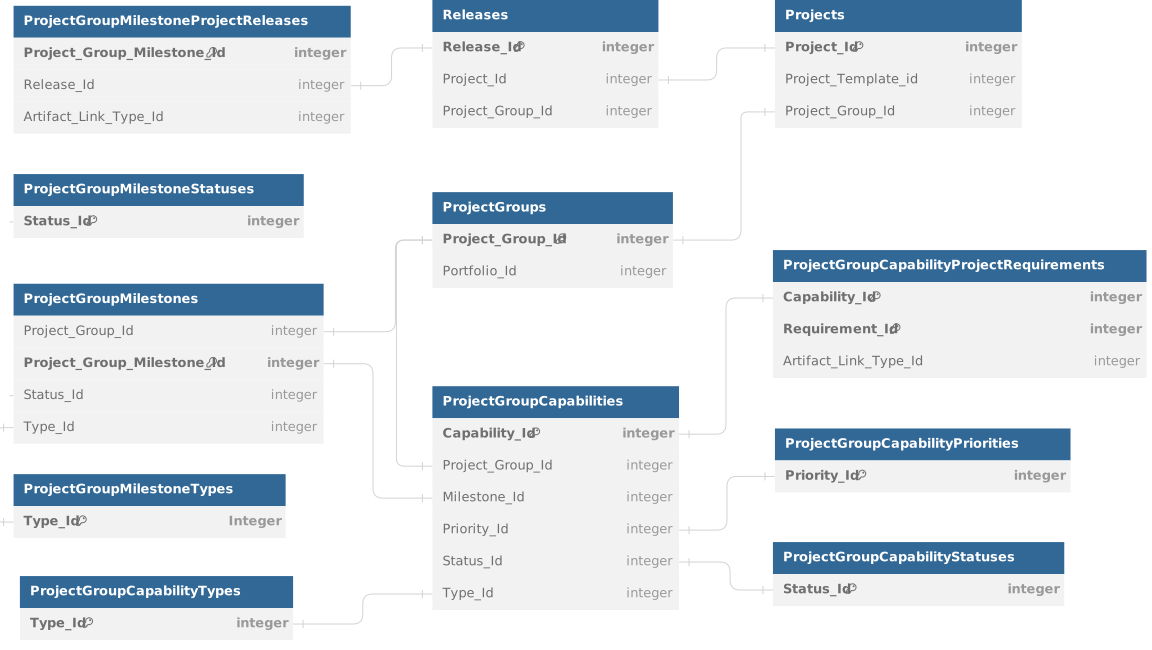
The list of entities in this group include:
Figure 1: Essetntial Product, Program, Portfolio Schema
Please click here for the DBNL reference file.
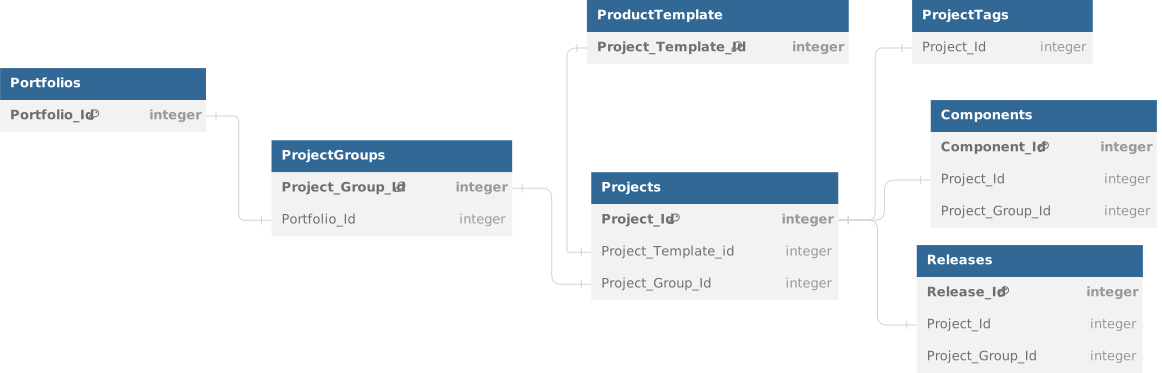
- Template Id is connected with the Product.
- Even SpiraTest and SpiraTeam allows grouping of projects into project groups identified by Project_Group_Id.
- Project Groups are called as Programs in SpiraPlan with SpiraDocs Reference for Additional functionalities like capabilities, milestones, etc.
- Projects are actually prodocuts in Spira. Products have a longer time frame.
- Components lend a business lens to the way the requirements are organized for product delivery.
- Releases are timeboxed intervals that represent the projects within the products.
- Project level tags are kept in a separate table. Artifact level tags are associated at the artifact specific tables.
- Use special tokens such as ${ProjectGroupId}, ${ProjectId}, ${ReleaseId} and ${ReleaseAndChildIds} as needed to connect with the current UI selection.
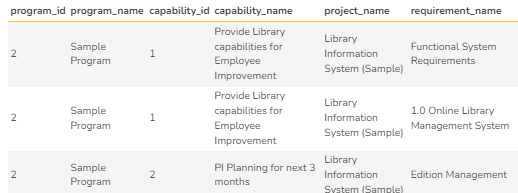
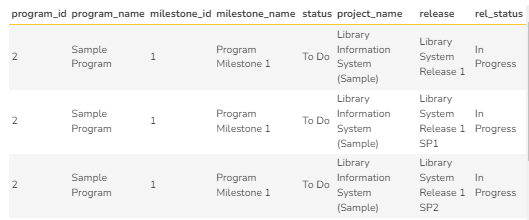
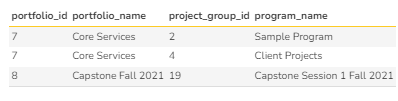
Use Case 1: Find out all the programs associated with a portfolio
| Query | Result |
select
pf.portfolio_id,
pf.name as portfolio_name,
pg.project_group_id,
pg.name as program_name
from
SpiraTestEntities.R_Portfolios as pf
join
SpiraTestEntities.R_ProjectGroups as pg on
pf.portfolio_id = pg.portfolio_id
|  |
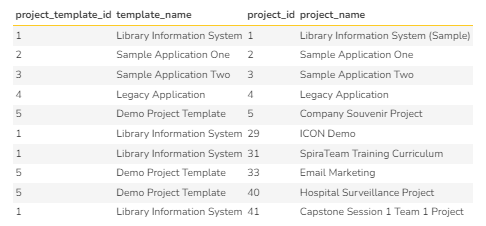
Use Case 2: Find out all the projects related using a specific project Template
| Query | Result |
select
pt.project_template_id,
pt.name as template_name,
p.project_id,
p.name as project_name
from
SpiraTestEntities.R_ProjectTemplates as pt
join
SpiraTestEntities.R_Projects as p on
pt.project_template_id = p.project_template_id
|  |
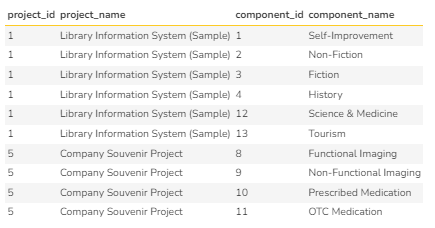
Use Case 3: Find all the components associated with a Project
| Query | Result |
select
p.project_id,
p.name as project_name,
c.component_id,
c.name as component_name
from
SpiraTestEntities.R_Projects as p
join
SpiraTestEntities.R_Components as c on
p.project_id = c.project_id
|  |
Essential Traceability
This group represents a collection of entities representing how essential artifact traceability is maintained. The traceability is mainly around Requirements, Test Cases, and Incidents and the associated tables that faciliate running queries.
Overview
Schema
Tips & Tricks
Example Queries
The list of entities in this group include:
Figure 2: Essential Traceability Schema
Please click here for the DBNL reference file.
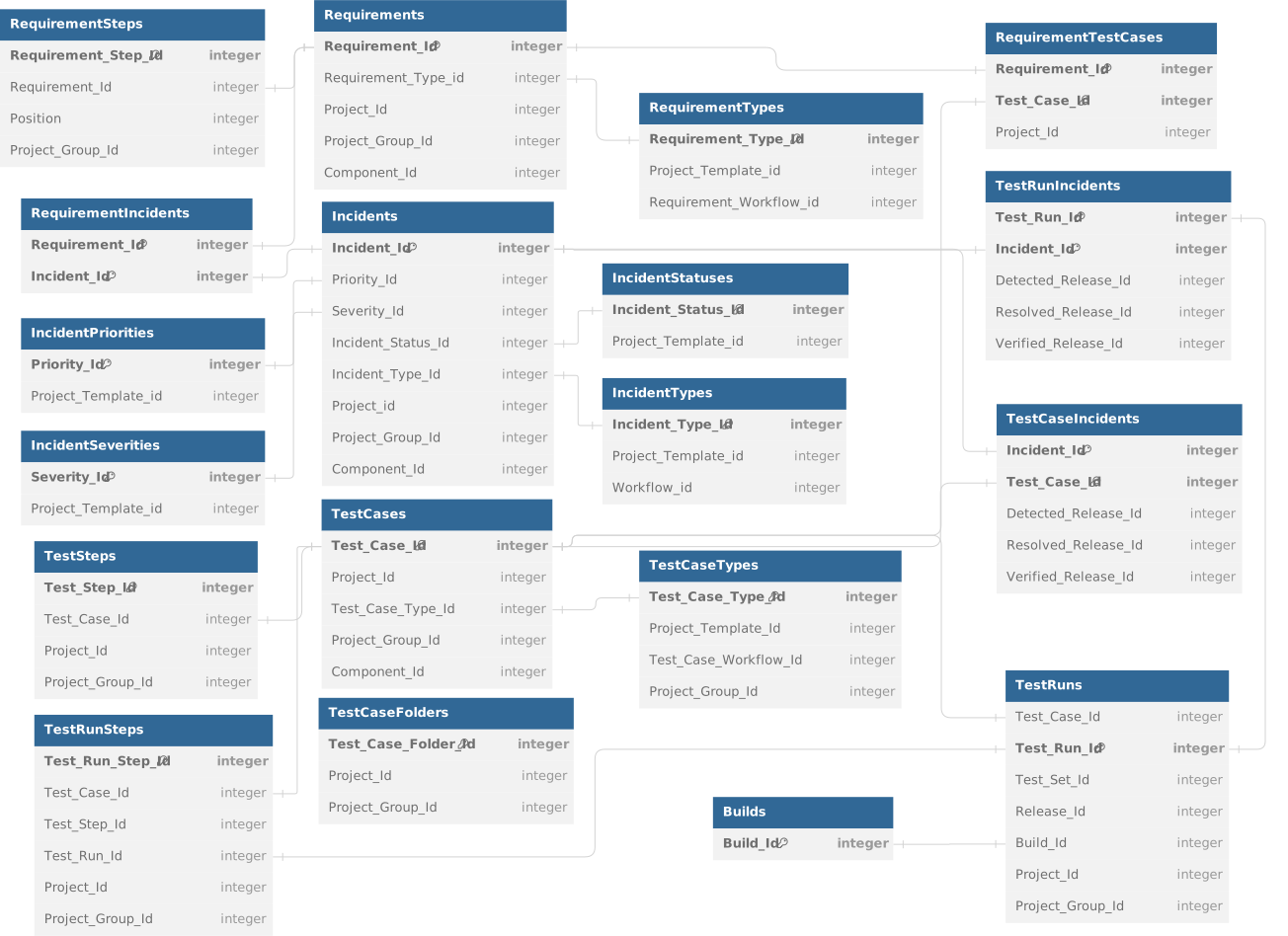
- Requirement Steps are relevant only when the requirement has scenario steps associated with it.
- Consolidated tables exist for RequirementIncidents, RequirementTestCases, TestCaseIncidents, TestRunIncidents to bring information related to requirements, testcases, and incidents efficiently.
- Test Runs represent the snapshot of test case or test set. Details of the steps inside a test case execution is captured in TestRunSteps.
- TestCaseFolders table contains information of test cases grouped in the test case folder hierarchy.
- Requirement Type are at the template level and contain types of requirements.
- Components lend a business lens to the way the requirements are organized for product delivery.
- Releases are timeboxed intervals that represent the projects within the products.
- The Spira interface will not show deleted artifacts. To supporess them in custom queries, use the Is_Deleted = "False" on the artifacts where this field is supported.
- The Spira interface may support hierarchical deinitions which may not be required in the custom reports. In such cases, use the Is_Summary = "False" on the artifacts where this field is supported.
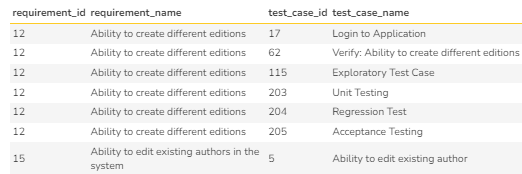
Use Case 4: Find out all the requirements with test cases
| Query | Result |
select
r.requirement_id,
r.name as requirement_name,
t.test_case_id,
t.name as test_case_name
from
SpiraTestEntities.R_Requirements as r
left join
SpiraTestEntities.R_RequirementTestCases as rt on
r.requirement_id = rt.requirement_id and
r.project_id = rt.project_id
join
SpiraTestEntities.R_TestCases as t on
t.test_case_id = rt.test_case_id and
t.project_id = rt.project_id
where
r.is_summary = False and
r.is_deleted = False
|  |
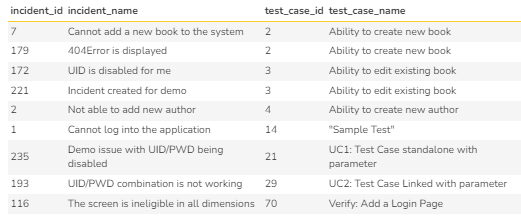
Use Case 5: Find all the incidents associated with a test case for the current project
| Query | Result |
select
i.incident_id,
i.name as incident_name,
t.test_case_id,
t.name as test_case_name
from
SpiraTestEntities.R_Incidents as i
join
SpiraTestEntities.R_TestCaseIncidents as ti
on i.incident_id = ti.incident_id
join
SpiraTestEntities.R_TestCases as t on
t.test_case_id = ti.test_case_id
where
i.project_id = ${ProjectId} and
i.is_deleted = False
|  |
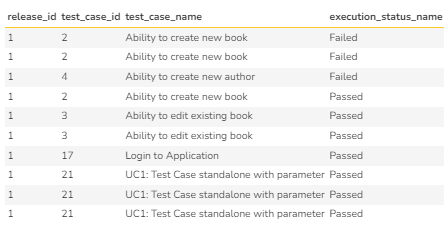
Use Case 6: Find all the execution status of all test runs for test cases for the current release
| Query | Result |
select
tr.release_id,
t.test_case_id,
t.name as test_case_name,
tr.execution_status_name
from
SpiraTestEntities.R_TestCases as t
join
SpiraTestEntities.R_TestRuns as tr
on tr.test_case_id = t.test_case_id and
t.project_id = tr.Project_ID
where
tr.release_id is not null and
tr.release_id = ${ReleaseId}
order by
tr.release_id
|  |
Scenario Traceability
This group represents a collection of entities that allow scenario level traceabilities. This collection includes Test Sets, Test Configuration, Automation Host, and information about Test Case and Test Incident collections for a test set.
Overview
Schema
Tips & Tricks
Example Queries
- Many organizations use a development pipeline enabled by continuous integration, continuous delivery, and continuous deployment (CICD) that require specific scenarios to be tested.
- Other small-to-medium organizations may require promotion of role based testing to increase the confidence of verification.
- Still organizations that involve regulated products, services, and results may involve validation after verification involving performance qualification, operational qualification, and installation qualification.
In all these scenarios, test sets, configurations, and automation may be involved. The list of entities in this group include:
Figure 3: Scenario Traceability Schema
Please click here for the DBNL reference file.
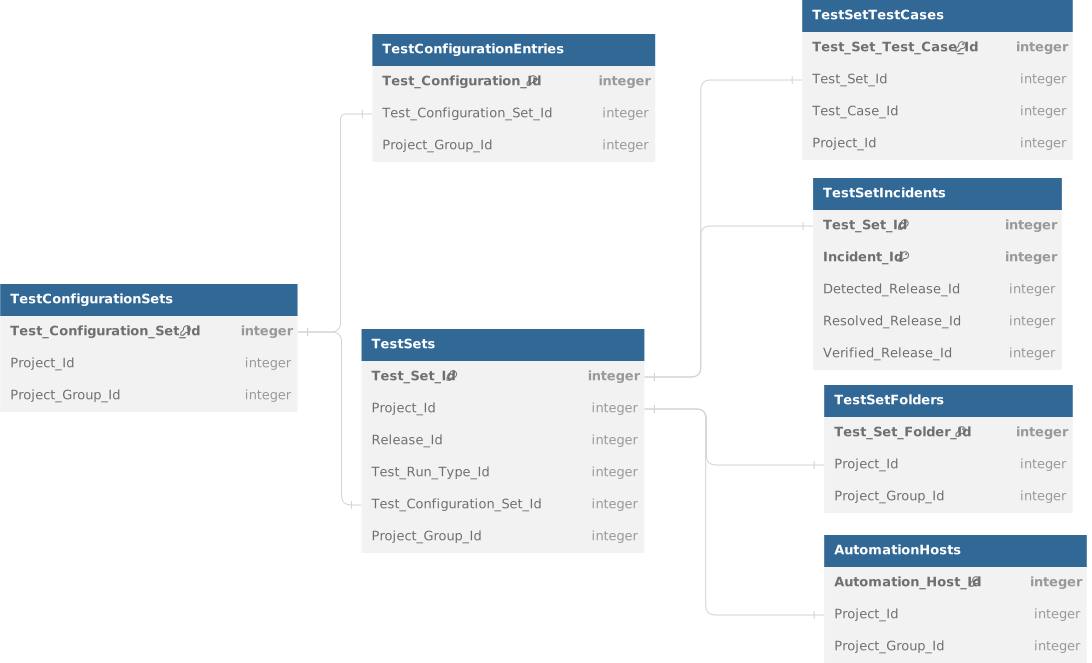
- Test_Configuration_Ids contain the combination values for every configurations.
- Test Set Configuration Ids contain the list of all combination of values for every combination added to to the test set.
- Test_Set_Test_Cases contain information about the test cases within a test set.
- TestSetFolders table contains information of test sets grouped in the test set folder hierarchy.
- Test Set Incidents contain all the incidents associated with the Test Sets.
- Automation Hosts contain information about the automation at the test set level.
- Remember to connect with Test Cases, Test Runs, Projects table with appropriate keys as needed.
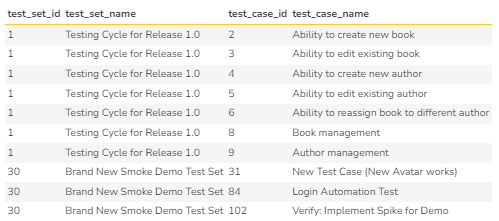
Use Case 7: Find out all the test cases associated with test sets for the current project and release.
| Query | Result |
select
tsc.test_set_id,
tsc.test_set_name,
tsc.test_case_id,
tsc.test_case_name
from
SpiraTestEntities.R_TestSetTestCases as tsc
join
SpiraTestEntities.R_TestSets as ts on ts.test_set_id = tsc.test_set_id
where
ts.project_id = ${ProjectId} and ts.release_id = ${ReleaseId}
|  |
Use Case 8: Find all the incidents associated with a test set
| Query | Result |
select
i.project_id,
t.release_id,
i.incident_id,
i.name as incident_name,
t.test_set_id,
t.name as test_set_name
from
SpiraTestEntities.R_Incidents as i
join
SpiraTestEntities.R_TestSetIncidents as ti
on i.incident_id = ti.incident_id
join
SpiraTestEntities.R_TestSets as t
on t.test_set_id = ti.test_set_id
where
i.incident_id = ${ProjectId} and
t.release_id = ${ReleaseId}
|  |
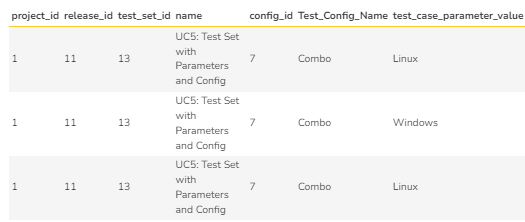
Use Case 9: Find all the configurations for a test set for a specific project and release.
| Query | Result |
select
ts.project_id,
ts.release_id,
ts.test_set_id,
ts.name,
ts.test_configuration_set_id as config_id,
tcs.name as Test_Config_Name,
tc.test_case_parameter_value
from
SpiraTestEntities.R_TestSets as ts
join
SpiraTestEntities.R_TestConfigurationSets as tcs
on ts.test_configuration_set_id = tcs.test_configuration_set_id and
tcs.project_id = ts.project_id
join
SpiraTestEntities.R_TestConfigurationEntries as tc
on tcs.test_configuration_set_id = tc.test_configuration_set_id
where
tcs.is_deleted = False and
tcs.is_active = True and
ts.project_id = ${ProjectId} and
ts.release_id = ${ReleaseId}
|  |
Team Accountability
This group represents a collection of entities that allow track tasks and risks that are associated with a project delivery team to monitor their progress towards completion while addressing any impediment, blocker, or obstacles.
Overview
Schema
Tips & Tricks
Example Queries
Project delivery teams, regardless of their chosen delivery methodology, uses tasks monitor the progress of their work within their release cadence. In plan driven approaches, the project managers use tasks to monitor the progress. In change driven approaches, the delivery team uses the tasks to monitor their definition of done. At the same time, every team uses risks to identify, evaluate, and treat risks that challenge their delivery. This section addresses entities related to these features.
Figure 5: Team Accountability Schema
Please click here for the DBNL reference file.
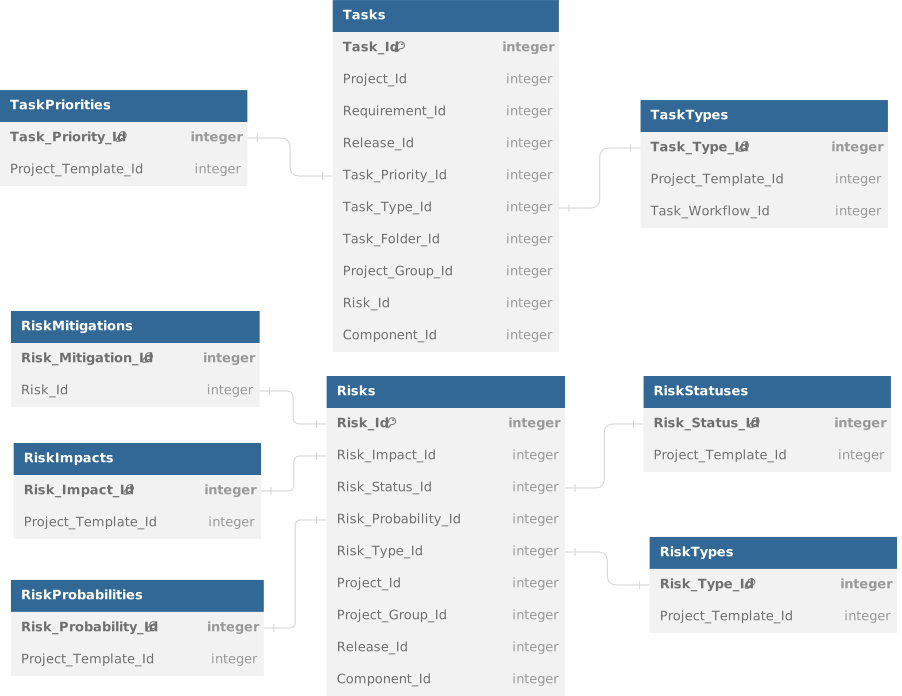
- Task Priority and Task Type are at the template level.
- Risk Priority, Risk Impact, Risk Type, and Risk Status are at the template level.
- Join with Projects, Project Groups, Releases, and Components with appropriate primary keys for SpiraDocs Reference for Additional details.
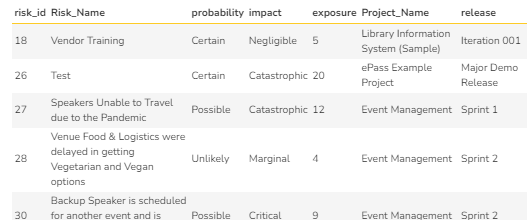
Use Case 13: Find all risks specific to a project and release.
| Query | Result |
select
r.risk_id,
r.name as Risk_Name,
R.risk_probability_name as probability,
r.risk_impact_name as impact,
r.risk_exposure as exposure,
p.name as Project_Name,
rl.name as release
from
SpiraTestEntities.R_Risks as r
join
SpiraTestEntities.R_Projects as p on
r.project_id = p.project_id and r.is_deleted = false
join
SpiraTestEntities.R_Releases as rl
on r.release_id = rl.release_id
|  |
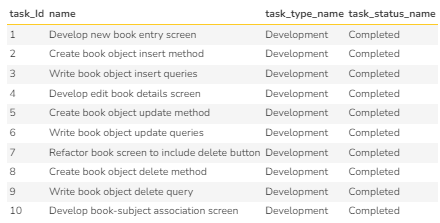
Use Case 14: Find all the tasks of a specific task type.
| Query | Result |
select
t.task_Id,
t.name,
t.task_type_name,
t.task_status_name
from
SpiraTestEntities.R_Tasks as t
where
t.project_id = ${ProjectId} and
t.task_type_name = "Development" and
t.is_delted = false
|  |
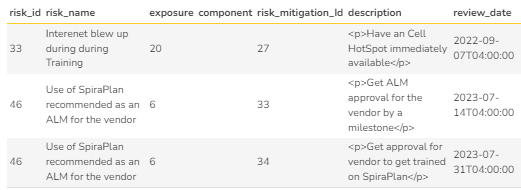
Use Case 15: Find all the risks and their mitigations for unknown (null) component.
| Query | Result |
select
r.risk_id,
r.name as risk_name,
r.risk_exposure as exposure,
r.component_name as component,
rm.risk_mitigation_Id,
rm.description,
rm.review_date
from
SpiraTestEntities.R_Risks as r
join
SpiraTestEntities.R_RiskMitigations as rm
on rm.risk_id = r.risk_id and rm.is_deleted = false
where
r.project_id = ${ProjectId} and
r.is_deleted = false and
r.component_name is null"
|  |
Product Auditability
This group represents a collection of entities that allow track baselines and history that are required for tracking changes for every artifacts as well as within every baseline. Since custom lists and custom properties further add definitions to the artifacts themselves, these definitions are also tracked in this section.
Overview
Schema
Tips & Tricks
Example Queries
Auditability involves tracking changes made. This involves changes made within an artifact as well as changes made to all the artifacts within a release. Hisotry details tracks changes to an artifact but baselines tracks changes to all artifacts within specific snapshots identified by the change sets.
Spira provides 99 custom properties that can be added to most artifacts. This custom property can be one of the many standard properties (number, text, date, user, release, etc.) or a user defined custom list values. This section also brings this information.
Figure 6: Product Auditability Schema
Please click here for the DBNL reference file.
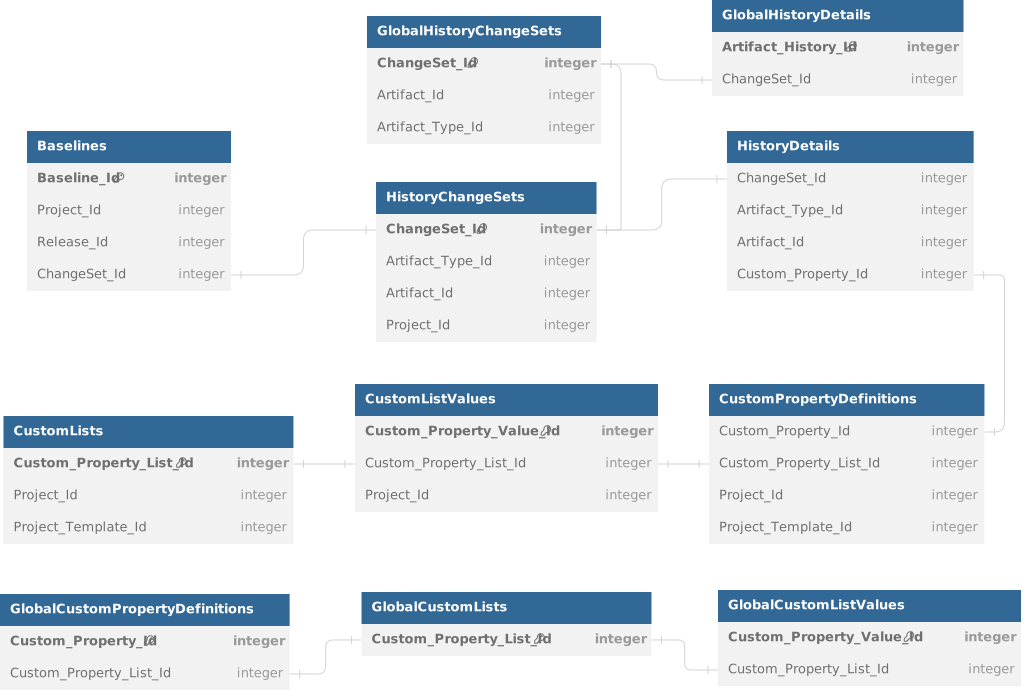
- Baselines are enabled at the Product Level and accessible at the Release Level.
- Baseline is not available in SpiraTest and captures changes made to all artifacts between two changesets.
- Custom Properties are mapped to CUST_XX values within a specific artifact. SpiraDocs Reference for Additional Joins required to get the value of the custom list.
- Join with Projects, Project Groups, Releases, and Components with appropriate primary keys for SpiraDocs Reference for Additional details.
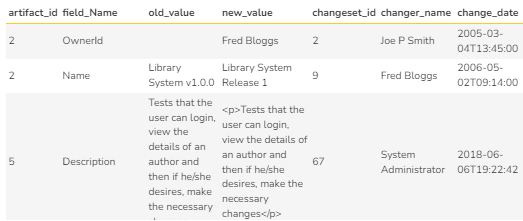
Use Case 16: Find the history of all changes for a specific artifact type (e.g.: Test Case) in a project.
| Query | Result |
select
h.artifact_id,
h.field_Name,
h.old_value,
h.new_value,
h.changeset_id,
h.changer_name,
h.change_date
from
SpiraTestEntities.R_HistoryDetails as h
join
SpiraTestEntities.R_ArtifactTypes as at
on at.artifact_type_id = h.artifact_type_id and
at.name = "Test Case"
join
SpiraTestEntities.R_HistoryChangeSets as hc
on hc.changeset_id = h.changeset_id
where
hc.project_id = ${ProjectId}
|  |
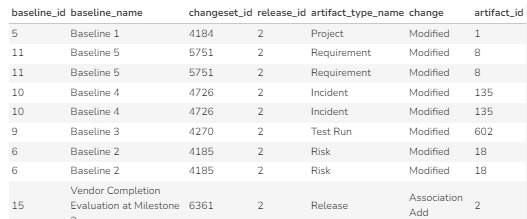
Use Case 17: Find all the artifacts that has changed in a project by a specific user (administrator).
| Query | Result |
select
b.baseline_id,
b.name as baseline_name,
b.changeset_id,
b.release_id,
b.last_update_date,
b.artifact_type_name,
b.changeset_type_name,
h.artifact_id
from
SpiraTestEntities.R_Baselines as b
join
SpiraTestEntities.R_HistoryDetails as h on
b.changeset_id = h.changeset_id
where
b.project_id = ${ProjectId} and
b.changeset_creator_login = "administrator" and
b.release_id = ${ReleaseId}
|  |
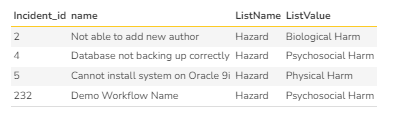
Use Case 18: Find all the custom values associated with a specific custom property (CUST_01) that is mapped to a custom list of an open atifact (Incident).
| Query | Result |
select
i.Incident_id,
i.name,
clv.custom_property_list_name as ListName,
clv.name as ListValue
from
SpiraTestEntities.R_Incidents as i
INNER JOIN SpiraTestEntities.R_CustomListValues as clv
on Contains(i.cust_01, Concat(Concat('0', cast(clv.custom_property_value_id as Edm.String)), ','))
or EndsWith(i.cust_01, Concat('0', cast(clv.custom_property_value_id as Edm.String)))
or StartsWith(i.cust_01, cast(clv.custom_property_value_id as Edm.String))
where
i.project_id = clv.project_id
clv.custom_property_list_id = 1
i.project_id = ${ProjectId}
i.incident_status_name = "Open"
clv.is_deleted = false
i.is_deleted = false
order by
i.name, clv.custom_property_list_name
|  |